



Instagram Web Viewer: View Posts Without an IG Account
Table of Content
What is the Instagram Web Viewer?
Ever tried to sneak a peek at someone’s Instagram profile — a celebrity, a potential collaborator, or just someone you’re curious about — only to be stopped dead by that dreaded login wall? “Sign up to continue.”
Annoying, right? You’re not looking to like, comment, or follow anyone. You just want to browse. Quietly. Anonymously.
So here’s the question: Can you actually view Instagram profiles, posts, or even Stories without logging in?
The answer: Yes — if you know the right tricks.
In this guide, we’ll walk you through multiple ways to view Instagram without an account — from simple hacks like direct links or Google searches to more powerful tools like Instagram post viewers and Instagram profile viewers. And if you want the smoothest, safest option? We’ll introduce DolphinRadar, an all‑in‑one web viewer that’s ad‑free, login‑free, and fuss‑free.
 Why People Want to View Instagram Without an Account
So why even bother with an Instagram post viewer?
For many people, it’s about privacy. They don’t want their browsing linked to a personal account — or worse, leave a visible trace. Others are casually curious or doing quick research on brands, influencers, or public figures, without the commitment of signing up for Instagram.
But Instagram doesn’t make it easy. That login wall is persistent. You can usually see just a handful of posts before getting blocked, and Stories or Reels? Forget it — those are off‑limits without signing in.
The upside? There are ways around it. You can still access public profiles, posts, bios, and even Highlights — no account needed. Just don’t expect to view private accounts, interact with posts, or watch every Story natively.
If you’re specifically interested in disappearing content, check out Can You View Instagram Stories Anonymously?. It explains how to watch Stories from public profiles privately, without leaving any trace.
Easy Ways to View Instagram Without an Account
You don’t actually need an Instagram account to see a lot of content. Here are some simple (and totally free) ways to peek behind the login wall.
1. Directly Access Public Profiles via URL
If you know the username, this is the fastest route.
Type this into your browser:
instagram.com/username
Example:
instagram.com/selenagomez
This opens the public profile and lets you see recent posts, the bio, follower counts, and Highlights.
The catch?
- No access to active Stories
- Private accounts stay off‑limits
- Limited scrolling — you’ll hit a wall after a few posts
- No liking, commenting, or following
It’s quick and easy, but don’t expect full functionality.
For Highlights, our guide How to View Anonymous Instagram Highlights Effectively walks you through exploring and even downloading them — completely anonymously.
2. Use Google to Search Instagram Content
Want to discover profiles or posts by keyword? Google can help.
In the search bar, type:
site:instagram.com your-keywords-here
Example:
site:instagram.com travel photography
This will pull up Instagram profiles and public posts matching your query. Click through to explore without logging in.
Heads‑up:
This only surfaces public content, and sometimes the results can be incomplete.
3. Browse Instagram Hashtags Without Logging In
You don’t even need an account to check out hashtag pages.
Just type this into your browser:
instagram.com/explore/tags/yourhashtag
Example:
instagram.com/explore/tags/catsofinstagram
You’ll instantly see top and recent posts under that tag. It’s a quick way to explore trending content or dive into specific topics — from food and travel to niche communities.
But keep in mind:
- Only public posts are visible.
- You can’t filter results or engage with the content.
- After some scrolling, Instagram may still nudge you to log in.
Still, for quick discovery? It’s simple and effective.
4. Use a Third‑Party Instagram Viewer (Like DolphinRadar)
If you’re tired of constant login prompts, it’s time for a third‑party Instagram post viewer.
Why? Because these tools let you browse public profiles, posts, Stories, Highlights, and even Reels — without signing up or revealing your identity.
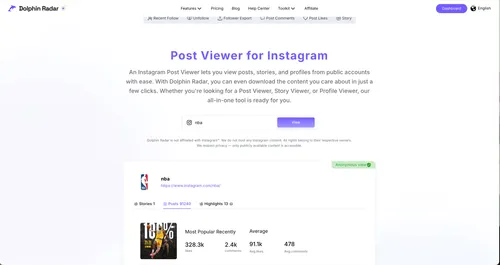
Take DolphinRadar for example. It offers:
- Ad‑free viewing of posts, Stories, and Highlights.
- Anonymous browsing — no fake accounts needed.
- Advanced features like profile tracking and engagement insights.
How it works:
- Go to DolphinRadar’s Instagram Viewer.
- Enter a username or paste the profile URL.
- Hit Search — and start exploring privately.
This removes Instagram’s browsing limits and adds features you won’t get from simple workarounds
Why DolphinRadar Is a Safer, Smarter Choice
Unlike juggling multiple free Instagram viewers (each packed with ads or limited features), DolphinRadar offers an all‑in‑one web viewer. In one clean interface, you can browse posts, Stories, Reels, and Highlights from public accounts — no endless pop‑ups, no switching between sites.
But DolphinRadar doesn’t stop there. It functions as an Instagram activity tracker, letting you:
- Monitor updates like new posts or follower changes.
- See engagement data such as likes and comments on public content.
- Continuously track profiles you care about — features most free viewers can’t match.
On top of that, it guarantees a safe, private experience:
- No login or registration required
- No usage tracking or session logging
- Full compatibility on desktop and mobile
- Anonymous access to Stories, Highlights, Reels, and posts from public accounts
In short: No logins. No spam. No limitations. Just a safer, more capable way to explore Instagram.
Can You View Private Instagram Profiles Without Logging In?
No. Private accounts are protected by Instagram’s privacy settings. You cannot see their photos, videos, Stories, or Highlights without the owner approving your follow request.
And beware: any site or app claiming to unlock private accounts is almost certainly a scam or a phishing attempt.
If your goal is simply to browse public content, the methods we’ve outlined above work perfectly. But if you want to interact with posts, use Instagram’s built‑in search, or view private profiles, the only legitimate option is to create an Instagram account. (Pro tip: you can sign up with minimal personal info or a pseudonym if privacy is your concern.)
What You Can (and Can’t) Do Without an Instagram Account
Here’s a quick recap of what’s possible — and what’s off‑limits — when browsing Instagram without logging in:
You CAN:
- View public Instagram profiles (photos, videos, bios).
- Browse public Stories and Highlights using third‑party viewers like DolphinRadar.
- Read comments on public posts (without interacting).
- Search profiles or hashtags using Google or other external tools.
- Stay completely anonymous — your activity isn’t visible to account owners.
You CANNOT:
- View private profiles or their content (no tool can bypass Instagram’s privacy settings).
- Like, comment, or follow any users — all interactions require an account.
- Watch active Stories in Instagram’s own app or web without logging in (you’ll need a viewer like DolphinRadar).
- Use Instagram’s internal search, Explore tab, or DMs — these are for logged‑in users only.
For casual, anonymous browsing, the methods in this article — especially using an all‑in‑one tool like DolphinRadar — are more than enough. But if you need to interact with posts or access private profiles, creating an account (even under a pseudonym) is the only real option.
And if you’re researching audience feedback or monitoring engagement, a tool to view and export Instagram comments is an excellent companion to simple profile viewing.
Frequently Asked Questions (FAQ)
Can I use DolphinRadar on my phone?
Yes. DolphinRadar works on both mobile and desktop browsers — no downloads required.
Will the account owner know if I viewed their profile using DolphinRadar?
No. Your activity is completely anonymous. Account owners will not receive any notifications.
Can I watch live videos or see who viewed Stories without an account?
No. Live videos and Story viewer lists require logging in. However, you can still view public Stories and Highlights anonymously with DolphinRadar.
Is DolphinRadar free to use?
Yes. Basic features are free, while advanced tools (like profile tracking or unlimited downloads) may require a subscription.
Can I download Instagram content with DolphinRadar?
Yes. DolphinRadar lets you download Stories, Highlights, Reels, and public posts easily.
Can I view private accounts with DolphinRadar?
No. Private accounts remain inaccessible without the owner’s approval.
Is using an Instagram web viewer safe?
Yes — as long as you use trusted tools. DolphinRadar only accesses publicly available data and never tracks your sessions.
Final Thoughts
Browsing Instagram without an account is completely doable. Whether you’re using direct profile links, Google search, hashtag pages, or a dedicated Instagram post viewer, there are plenty of ways to access public content quickly and anonymously.
For the best experience, choose trusted, ad‑free tools. DolphinRadar is one of the most reliable options — an all‑in‑one web viewer that lets you browse posts, Stories, Reels, and Highlights without the login walls, ads, or risk.
If you regularly check Instagram content without logging in, give DolphinRadar a try. It simplifies the process, adds powerful tracking features, and keeps your browsing fully private.
👉 Start using DolphinRadar’s Instagram Web Viewer here — explore Instagram hassle‑free and anonymously.
Read More
