



How to Track Instagram Recently Followed Accounts? (2024)

Table of Content
How To See Who Someone Recently Followed On Instagram
Basic steps for how to see who someone recently followed on Instagram:
- Open the Instagram application on your device.
- Log into your IG account.
- Enter the Instagram username you want to visit on the Search tab.
- Click on their profile from the results list, then go to their Following tab.
- The profiles they recently followed might appear at the top of their list. Scroll through their following list for a full view.
Exploring the most appropriate Instagram settings to have an accurate list of accounts someone recently followed on the platform can be time-consuming. While numerous guides and instructions are available, not all methods may be helpful and applicable to all users. So, in this blog, we’ll go over all the options for how to see who someone recently followed on Instagram, both with and without using third-party applications.
Instagram Following List Order
Have you ever attempted to use the “sort Instagram followers by most recent” feature on other users’ profiles, only to find that it doesn’t work? This could be because Instagram either never had this feature or it was removed in a recent update. Unfortunately, with the current app version, there is no surefire way to sort someone else’s following list. However, you can still sort your own followers. Here’s how to do it:
- Open Instagram on your device.
- Click on your account profile icon.
- Tap on the Following option.
- Look for the Sorted by Default section and click the up and down arrow sign.
- Change the setting, and select Date followed: Latest to sort by most to least recent.
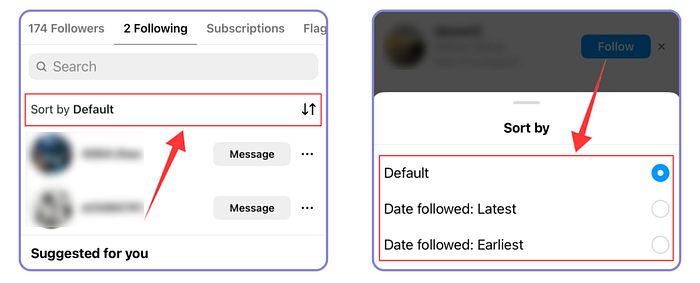
How does Instagram sort and display the following lists of its users? Instagram randomizes the order for every user’s following list, so you’ll never know which profiles were followed when. The list may also differ depending on the device. It’s nearly impossible to see which are the newly-followed accounts from someone’s following list, especially if they have over 500 followers.
Techniques to See Who Someone Recently Followed On Instagram
For the most accurate way to see who someone recently followed on Instagram, try using a web browser (or enable desktop view on your mobile browser). Newly-followed profiles by other users might appear at the top of their following list. Additionally, you can use your Instagram notifications to verify if your findings are correct.
How To See Who Someone Recently Followed On Instagram Through IG Notifications (for Android/ iOS devices)
- Open the Instagram application on your device.
- Go to your Instagram account Notifications. Check for the updates that say one or two of your mutual connections just followed someone (user X).
- Click on the name of your Instagram mutual connection and locate the name of user X from their following list. If you see the name of user X around the top of their list, you can confirm you are viewing them from the most recent down to the oldest followed accounts.
Verify your search by opening your phone’s browser. Simply open instagram.com, enable Desktop Site or view on the settings, log in to your account, and follow the same procedures above. Use the same method on your computer to check the results. Another technique you can also try is using Instagram’s Supervision feature.
Use Instagram Supervision to See Who Someone Recently Followed On Instagram
- Log in to Instagram and tap on your profile icon.
- Click the three stacked menu lines (A.K.A. the Hamburger button) at the corner of your screen.
- Go to the Supervision section. Then, choose your settings and add the account you want to supervise.
You can only use Instagram’s Supervision feature to monitor a teen’s account (users aged 13 to 17 years old). This tool will allow you to closely monitor another user’s Instagram activities, including who they connect with and follow. If you’re a parent who wants to manage your child’s Instagram account, this feature is best for you. It sends you updates on your teen’s followers, recently followed profiles, Instagram time usage, and other platform activities.
But, there are two caveats: (1) both the parent and the teen must agree to participate and set up Instagram’s supervision tool, and (2) the parental supervision feature will automatically end when the teen turns 18.
Using Third-Party Tool
Instagram users may also try a third-party tool or browser extension for more accurate search results. This tool can help extract information from Instagram and update you on the latest activities of other users on the app. Some third-party applications offer features like weekly reports of recent likes, interactions, and followed accounts. Such a tool can provide better records to see who someone recently followed on Instagram.
While a third-party tool can offer more accurate search results, it’s important to be cautious. Connecting your Instagram account to an unsecured third-party tool can put your account information and privacy at risk. Additionally, some tools may require fees for usage. If you decide to use one, choose a trusted and well-reviewed tool.
For a safe option that doesn’t require access to your Instagram account, we recommend Dolphin Radar. This tool allows you to track Instagram activities securely without compromising your account.
How to Track an Instagram Account with Dolphin Radar
For a comprehensive and time-efficient method, Dolphin Radar is the best choice. Dolphin Radar is an online tool that allows you to track any public Instagram account. It provides weekly reports on activity, such as post likes, new follows, top hashtags, and the accounts they interact with the most.
Benefits of Using Dolphin Radar
· Ease of Use: No need to access the person’s phone or passwords. Just enter the Instagram handle.
· Detailed Reports: Get clear, thorough, and accurate data.
· Discreet Tracking: Dolphin Radar isn’t linked to your Instagram account, so the tracked user won’t know they’re being monitored.
How to Use DolphinRadar
DolphinRadar is an advanced tool that allows you to monitor Instagram activities anonymously. It provides detailed reports on what content is liked, who is followed, and overall engagement metrics. To get started:
- Sign Up: Create an account on DolphinRadar’s website.
- Enter Username: Input the Instagram username of the account you want to monitor.
- Generate Report: Wait for DolphinRadar to gather data and generate a comprehensive report.
Here’s an example of an activity report for Kylie Jenner’s Instagram: Kylie Jenner Activity Report.
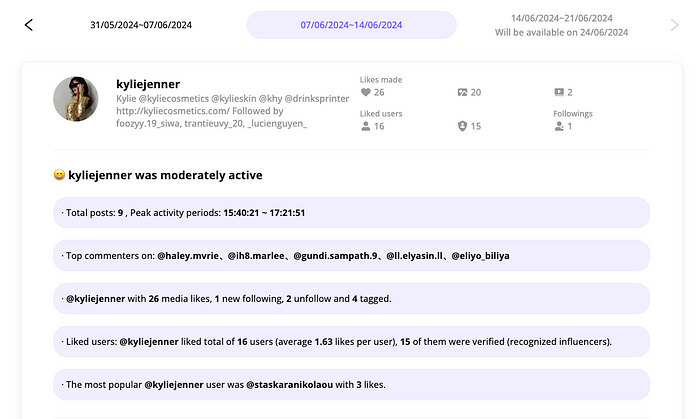
Advantages of Tracking an Instagram Account with Dolphin Radar
Dolphin Radar provides benefits that manual tracking and spyware apps cannot match. First, the data you receive is detailed, precise, and reliable. Second, the tool operates with high discretion. Dolphin Radar is not connected to your Instagram account in any manner. The user won’t be aware they’re being monitored, and they won’t know specifically that you are the one tracking their activity.
Conclusion
Track Instagram Recently Followed Accounts? It’s not as daunting as it seems with the right tool at your disposal. With Dolphin Radar, you can get the accurate and detailed information you need through a simple, efficient, and affordable tool. Try Dolphin Radar today to see for yourself.
Read More
