



See Who’s Active on Instagram

Table of Content
Why Track Instagram Activity?
Tracking Instagram activity offers several benefits, including:
- Staying Updated: Keep up with the latest posts and stories from your favorite accounts.
- Engagement Insights: Understand when your followers are most active to optimize your posting schedule.
- Relationship Management: Know when friends or family are online to interact with them.
- Monitoring: Ensure that loved ones, especially teens, are engaging in safe and positive online behavior.
Built-in Instagram Features
Instagram itself provides a few features to help you see who’s active:
See who’s active on Instagram
You can see when an account you follow and anyone you message was last active or is currently active on Instagram when you both have Activity Status turned on.
There are a few ways to see when someone’s active on Instagram:
· You’ll see a green dot or a timestamp next to the profile picture of people you follow or have direct conversations with.
· In your direct inbox, you’ll see their most recent Activity status (example: Active 25m ago, Active yesterday, Seen, Typing…).
· When you open a chat, you’ll also be able to see activity (example: In the chat, In the camera).
Keep in mind that if your Activity Status is off, you will not be able to see who’s active on Instagram.
While these features are helpful, they are somewhat limited in scope and functionality. For those who want more detailed insights, a dedicated Instagram activity tracking tool like Dolphin Radar is the way to go.
Introducing Dolphin Radar
Dolphin Radar is an advanced Instagram activity tracking tool designed to provide comprehensive insights into Instagram usage. Here’s what makes it stand out:
- Detailed Reports: Receive detailed reports on engagement metrics, including likes, comments, and follows.
- User-Friendly Interface: Navigate through a sleek, easy-to-use interface that simplifies the tracking process.
- Privacy and Security: Rest assured knowing that Dolphin Radar prioritizes your privacy and security, using state-of-the-art encryption and data protection methods.
How to Use Dolphin Radar
Using Dolphin Radar is straightforward and can be done in a few simple steps:
- Sign Up: Create an account on the Dolphin Radar website.
- Add accounts: Adjust the settings to track specific accounts or activities you’re interested in.
- View Reports: Access detailed reports through your dashboard.
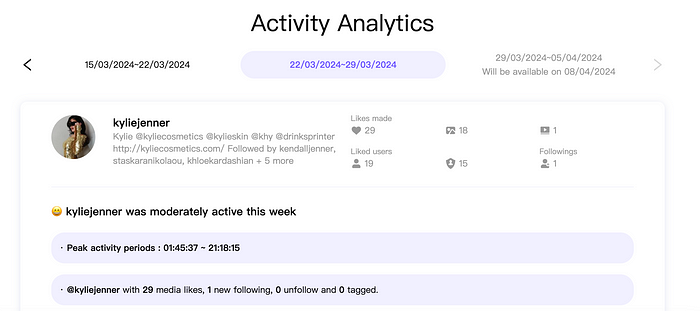
Dolphin Radar grants you the ability to oversee the social media activities of any Instagram user effortlessly. This is achieved without connecting directly to their account or engaging in any behavior that might alert the user of being observed.
After you’ve created an account with Dolphin Radar, you just need to enter the username of the person you want to follow. You don’t have to give Dolphin Radar access to your own account to do this — not even your Instagram username — and the person you’re tracking won’t be alerted that they’re being watched.
With Dolphin Radar, you’ll start getting weekly insights into the Instagram activities of the accounts you’re tracking. This includes recent follows, likes, top interacted users, comments made, favorite content categories, and a list of those they engage with the most.
Dolphin Radar’s reports allow you to trace changes in Instagram activity over time, providing historical data comparisons.
Absolutely, Dolphin Radar is the top choice for discreetly observing any Instagram account. No app installations or account access required — just pure, in-depth insights. Get started with Dolphin Radar for the deepest dive into Instagram analytics available.
Conclusion
Staying informed about Instagram activity is essential for optimizing your social media interactions and engagement. While Instagram offers basic features to see who’s active, Dolphin Radar provides a comprehensive solution for those who want more in-depth insights. By leveraging the power of Dolphin Radar, you can enhance your Instagram experience, ensuring you never miss out on important updates and interactions.
Read More
