



What Order Does Instagram Show Followers?
Table of Content
Last updated: July 29, 2025
This page has been updated for 2025 to reflect Instagram’s latest features and policies.
Ever scrolled through your follower list and wondered why certain people appear at the top while others are buried below? Instagram’s follower and following lists are not random. Instead, they’re shaped by complex algorithms that reflect your behavior, interests, and social graph.
In this guide, we’ll break down how Instagram ranks your followers and followings, what influences that order, and how you can use this knowledge to your advantage.
How Instagram Sorts Followers vs. Following Lists
Instagram uses sophisticated algorithms to organize your follower and following lists, prioritizing relevance and engagement rather than chronological order. While this sorting method may seem random, it actually reflects your interactions, mutual connections, and interests.
Why You Can’t See Followers Chronologically Anymore
At an earlier stage, Instagram officially removed the chronological sorting option for followers lists. According to Instagram’s official blog announcement, this change was implemented primarily to protect user privacy and reduce the ease with which individuals could track someone else’s follower activity.
As a result, your followers now appear in a personalized order that frequently changes based on your ongoing interactions, mutual followers, and other engagement signals. Understanding this personalized algorithm can clarify why certain followers appear higher in your list — and help you find alternative ways to view recent followers.
Followers List
The followers list is algorithmically sorted, meaning you cannot manually change its order. Instead, Instagram analyzes your social signals and ranks the list based on perceived relevance and relationship strength.
Factors include:
- Engagement Frequency — Likes, DMs, story replies, and other active interactions weigh heavily.
- Mutual Connections — When you view someone’s followers list, accounts that you have in common (mutual followers) tend to appear at the top.
- Recency of the follow — Newer followers are temporarily prioritized for better visibility. (see: Recent Followers)
- Geographic Signals — Accounts in your city, country, or timezone are often ranked higher.
- Shared Interests — If someone engages with content similar to yours, the algorithm may connect you.
- Profile Visits — Users who frequently view or spend time on your profile tend to rank higher.
✅ Tip: If your account has fewer than 200 followers, Instagram may sort this list alphabetically based on display names.
Following List
This is the list of users you follow. Instagram offers manual sorting, allowing you to choose the most helpful view:
- Sort by Default: Most engaged and relevant accounts first
- Sort by Latest: Most recently followed accounts
- Sort by Earliest: First accounts you ever followed
To change sort order: Instagram → Profile → Following → Tap Sort icon
Limitations of Instagram’s Sorting Options
It’s important to note that Instagram provides no native option to sort your followers chronologically or by any other specific criteria within the app. Even if you reopen your followers list frequently, Instagram continuously reshuffles the order based on real-time interaction data.
Moreover, even third-party tools face significant restrictions because Instagram’s API explicitly does not share follower timestamps or chronological data. As a result, approved third-party apps cannot directly provide follower data ordered by follow-date, creating a major limitation if you’re looking to see who recently followed you. This limitation underscores the necessity for alternative methods, such as external tracking tools, to fill this gap.
Do Small and Large Accounts Show Followers Differently?
Instagram’s follower-sorting logic varies notably based on account size and the amount of available engagement data:
- Small Accounts (typically under 200 followers) — With limited engagement signals available, Instagram might sort these followers lists in a way that appears more straightforward — often alphabetical by display names or even slightly chronological. New followers may be easier to spot, simply because the algorithm has less interaction data to prioritize.
- Larger Accounts (hundreds or thousands of followers) — These accounts rely heavily on Instagram’s complex engagement-driven algorithms. Recent followers rarely appear near the top unless they engage significantly soon after following. Users you regularly interact with dominate the upper ranks, making it difficult to identify new followers without specialized tools.
Understanding this nuance helps clarify why follower lists can seem unpredictable, particularly for larger profiles. For those needing to see new followers clearly, tools specifically designed for tracking recent follower activity offer a practical solution.
Factors that Affect the Order of Instagram Followers
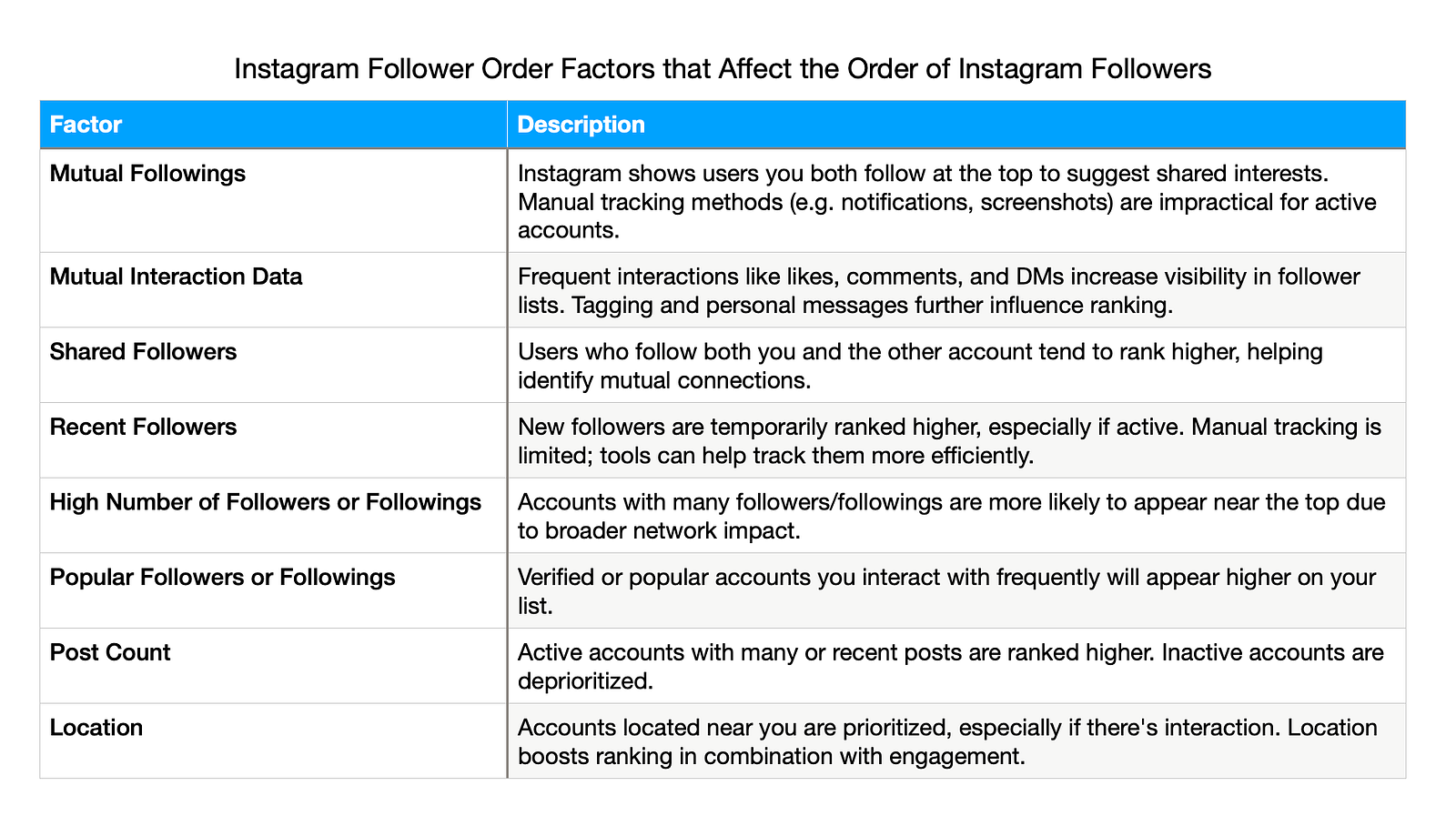
1. Mutual Followings
When you check a user’s followers list, Instagram tends to display users that you both follow at the top. Displaying mutual followings helps users identify shared interests. For instance, if you and another user both follow the same fashion influencer, it might suggest common interests and encourage a deeper connection.
Mention that a user can turn on follow notifications or check their Instagram “Activity” feed to catch new followers, or manually record follower counts and compare over time. However, for most users these methods are time-consuming, easy to miss, and impractical — especially for busy or popular accounts. For example, You could try to manually track followers — say, by enabling notifications for new followers, or periodically taking screenshots of your followers list to spot new names. But these manual tricks quickly become cumbersome and unreliable, particularly if you gain followers regularly. Instagram’s own activity feed only shows a limited history. This is where an automated solution can save you a lot of hassle.
2. Mutual Interaction Data
Likes, comments, saves, and shares are all forms of interactions on Instagram. The more you interact with someone, the higher they will appear on your followers list. Even if you don’t follow someone but interact with them frequently, they can appear towards the top. They won’t rank higher than someone you follow and interact with often, but they will still have high visibility.
Interactions like tags and direct messages, which indicate personal relationships, also influence the order.
3. Shared Followers
Instagram typically displays shared followers at the top of a user’s followers list. These are users who follow both you and the other person’s account. Displaying mutual followers helps identify people you might know based on shared connections.
4. Recent Followers
Recent followers also appear high on the follower list, especially if they are active on Instagram, post often, and have a large following. Learn how to track your most recent followers here.
5. High Number of Followers or Followings
Users with a large number of followers and followings are more likely to rank higher on a follower list.
6. Popular Followers or Followings
Popularity can boost some accounts to the top of your follower list, especially if you interact with them frequently. Verified followers you often message, for instance, might appear at the top of your list.
7. Post Count
Posts matter. If an account goes inactive, it’s less likely to be at the top of a follower list. Instagram’s algorithm seems to favor::
- Accounts with a lot of posts
- Accounts that posted recently
8. Location
A user’s geolocation can also affect their position on a follower list. Users who are closer to your location are more likely to appear higher on your list.
If you and another one of your followers are living in the same city, they may appear higher up on your follower list. That person will appear even higher if they not only live near you but interact with you on Instagram.
It’s also important to remember that these shifts weren’t random — they reflect a broader move by Instagram to prioritize user privacy. By removing clear chronological order in follower lists, the platform aims to reduce tracking behavior and discourage unwanted attention. That’s why it’s no longer easy to see who just followed whom — and why many users now turn to external tools for that visibility.
What Does “Sort By Default” Mean?
The “Sort by Default” feature within the Following list reflects Instagram’s internal ranking system. It isn’t chronological. Instead, it blends several signals:
- Your direct engagement with the account
- Shared followers and interests
- Mutual location and frequency of visits to each other’s profiles
You may also notice:
- Accounts you message often rank higher
- Stories and tagged posts also influence placement
- Sometimes unfamiliar profiles surface higher due to testing or common audience overlap
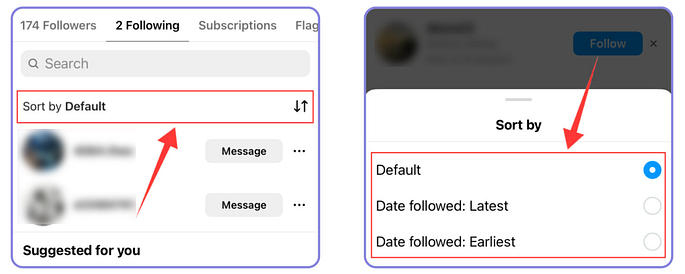
The “Sort by Default” option in your Following list reflects Instagram’s internal algorithm — it ranks accounts you follow based on engagement, shared interests, location, and other behavioral signals. Unlike this list, your Followers list has no sorting controls at all. You can’t view it chronologically or by relevance — it’s entirely algorithmic and changes dynamically each time, offering no way to track recent followers without third-party help.
How Instagram Followers Are Ordered in 2025
1. High-Value Engagement Signals
Instagram gives priority to users who engage in meaningful ways. This includes likes, shares, replies, DMs, and tagging. The stronger and more recent the signal, the more likely that person is to appear at the top of your followers list.
2. Network Density & Social Graph Influence
When someone is followed by many of your friends, or if you frequently interact with the same accounts, Instagram identifies them as part of your core network — even without direct communication.
3. Interest Graph and Content Affinity
Accounts that engage with similar content (e.g., fashion influencers, meme accounts, or wellness creators) are seen as contextually relevant to each other. Instagram uses content graphing to match you with users who may not be in your social circle but behave similarly.
4. Geo-location Data
Instagram enhances local discovery by boosting followers near your physical location. If someone recently tagged a nearby café you frequent or posted in your city, they may show higher in your list, particularly if your device location overlaps.
5. Account Activity Patterns
Active accounts — those posting regularly, responding to DMs, and interacting with others — are more likely to maintain a prominent list position. Dormant accounts fall in rank over time.
6. Recency of Follow
New followers get a temporary boost. This short-term visibility makes it easier for you to engage, follow back, or ignore. If engagement doesn’t happen quickly, the algorithm will lower their position.
7. Account Type, Verification & Authority
Verified users, high-follower accounts, or creators with frequent engagement may rank higher in lists by default. Instagram assumes these users carry more influence, regardless of your personal connection.
Why Does Follower Order Matter?
Your followers list reflects how well your Instagram account is growing and its reach. For example, if your follower list includes highly respected accounts, influencers, and thought leaders, it demonstrates authority. When potential followers see this, they are more likely to follow you. If you appear at the top of other people’s follower lists, you may also gain new followers as a top follower.
Instagram’s algorithm may change, but one thing remains constant: if your follower list is topped with authoritative figures, people will take notice.
Additionally, if you appear at the top of others’ follower lists, you may gain new followers by being recognized as one of their top followers.
By now, you should have a good understanding of how Instagram orders your followers. However, manually checking and analyzing your followers list can be time-consuming. Instead, why not use a third-party tool to help simplify the process?
Use a Tool to See Recent Followers and Follows by Time
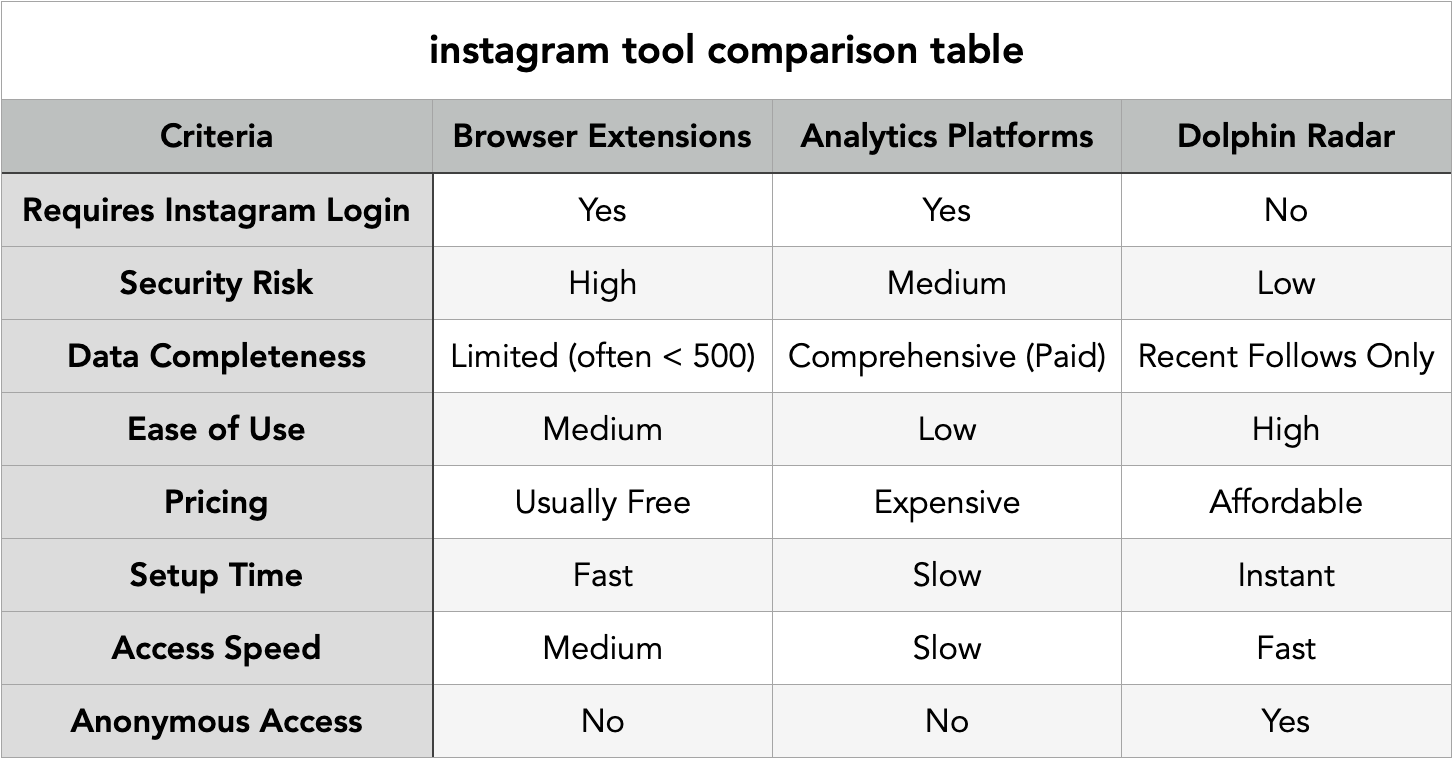
The table below compares common tools for viewing recent Instagram follower activity. While browser extensions and analytics platforms have limitations in security, pricing, or ease of use, Dolphin Radar offers fast, anonymous access without requiring a instagram login.
Manually checking who someone followed or who followed them on Instagram takes time. A smarter way is to use Dolphin Radar’s Recently Followed tool. It shows the latest followers and follows of any public Instagram account in clear time order.
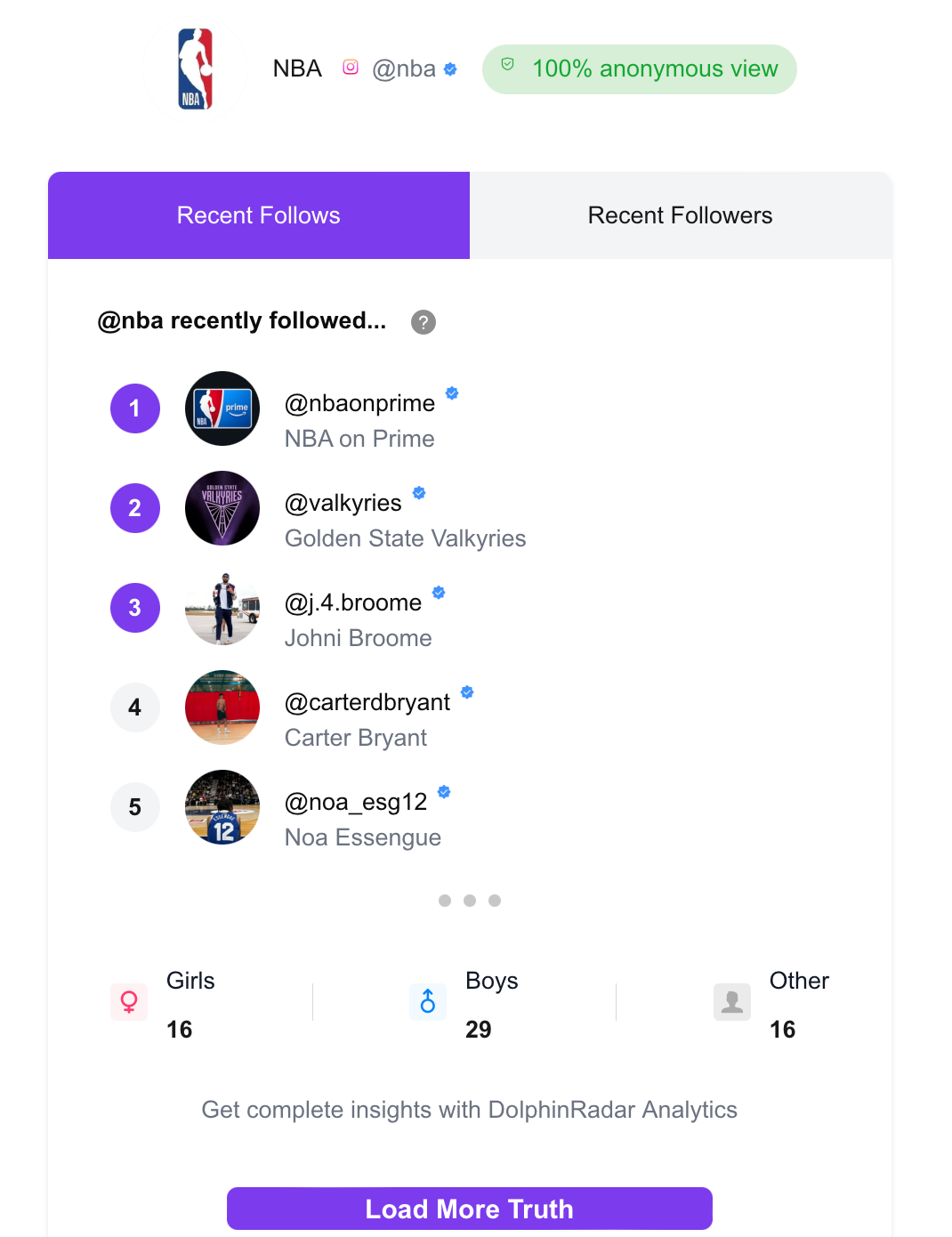
It’s simple to use — just enter the Instagram username you want to check. The tool quickly analyzes the account’s public data and gives you instant results. You’ll see the most recent follows and followers, making it easy to track changes over time. For example, we tested it by entering @nba, and it instantly showed the accounts the NBA profile had recently followed and who had followed them back.
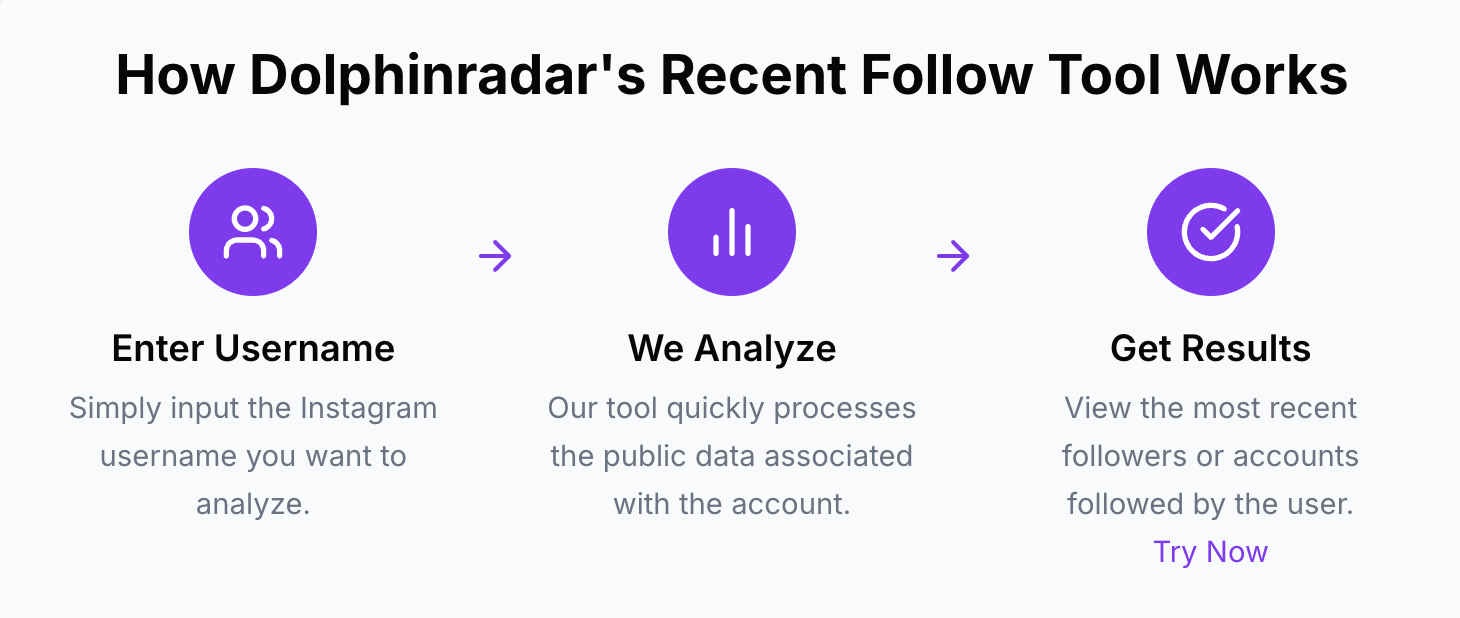
The tool quickly analyzes the account’s public data and gives you instant results — all without requiring you to log into Instagram or install anything. Because it’s a web-based solution, you can use it on any device securely and anonymously.
try Dolphin Radar’s Recently-Followed tool here » https://www.dolphinradar.com/instagram-new-follow-tracker
How to See Instagram Following in Chronological Order
If you prefer to check manually within Instagram, you can sort your following list by time to review who you followed recently or revisit your earliest followings.
Here’s how to do it:
- Go to your profile
- Tap “Following”
- Tap the Sort icon
- Choose:Sort by Latest → Most recent followsSort by Earliest → First follows since joining Instagram
This is helpful for unfollowing inactive accounts, evaluating influencer timelines, or re-engaging with old collaborators.
The Followers list does not currently support chronological sorting manually.
Stay Safe: Avoid Risky Apps and Protect Your Account
It’s important to understand that Instagram’s Terms of Use strictly prohibit unauthorized scraping, automation, or the use of bots to collect data. Many third-party tools — especially those asking for your Instagram login — fall into risky territory. In fact, accounts have been suspended or shadowbanned for using tools that violate these policies.
Any service that asks for your Instagram username and password, or that attempts to mass-access data in ways Instagram hasn’t authorized, can not only breach platform rules — it can also put your account at serious risk. These tools often operate in gray areas (or outright violate policy), and you never truly know how your data is being handled behind the scenes.
That’s why Dolphin Radar takes a completely different approach. It never asks for your login credentials and doesn’t access anything beyond what’s already publicly available. Instead, it works like a regular user checking profiles — just faster and automated. Because it stays within Instagram’s allowed usage boundaries, there’s no risk to your account, privacy, or data.
Pro Tips to Manage and Monitor Your Followers
Leverage Instagram Insights: If the user has a Business/Creator account, remind them to use the third-party Insights tool to watch follower growth and top time zones/when followers are active. This keeps users engaged on the platform and complements using Dolphin Radar for specifics.
Regular Engagement: Encourage the user to interact with new followers (e.g., greeting new followers in DMs or at least liking/commenting on their content) to nurture those connections — tying into the fact that engagement influences list order.
Quality over Quantity: Advise monitoring for fake or inactive followers. This indirectly promotes checking recent followers and cleaning up spam followers (something Dolphin Radar could help identify if someone is suddenly followed by many suspicious accounts).
FAQs
What does “Sort by Default” mean on Instagram?
It means Instagram shows your Following list based on who you interact with the most, who’s most relevant to you, and shared connections.
Are follower lists shown in order?
Yes — but not chronological. They’re ordered based on Instagram’s internal algorithm reflecting relevance and interactions.
Can I reorder my follower list?
No, the algorithm controls this order. Manual sorting is only available for the Following list.
Why is my follower list constantly changing order?
The list dynamically updates based on ongoing interactions, story views, likes, and follower overlap.
Can I see someone else’s followers list in order?
Not exactly. You’ll see mutuals prioritized, but the order depends on their algorithm — not yours.
How can I track who recently followed someone?
Use a third-party tool like Dolphin Radar for safe and login-free recent follow tracking.
Are followers ever sorted alphabetically?
Yes, Instagram may apply alphabetical sorting for accounts under 200 followers.
What influences the follower list most?
Engagement signals, location, account activity, verification status, and behavioral similarity.
And if understanding follower order isn’t enough, exploring their recent likes can give you an even clearer view of their activity. (Check out our guide on how to see what someone likes on Instagram.)
Final Thoughts
Instagram’s follower and following list orders are personalized windows into your social activity. They help surface the people and accounts most relevant to you — and those that are most engaged.
By understanding how this works, and using the right tools, you can:
- Build a stronger network
- Increase your exposure
- Spot growth opportunities faster
For anyone seeking a simple, effective way to monitor Instagram activity, Dolphin Radar is the ultimate Instagram tracker to try. With its Recently Followed tool, you can instantly see who’s following or unfollowing any public account in real time. Beyond recent followers, Dolphin Radar provides detailed reports and analytics, helping you gain valuable insights while saving time. Don’t waste time with risky apps or tedious manual checks — let Dolphin Radar streamline your Instagram monitoring safely.
Read More
