



How to Use Instagram Story Viewer Tools
Table of Content
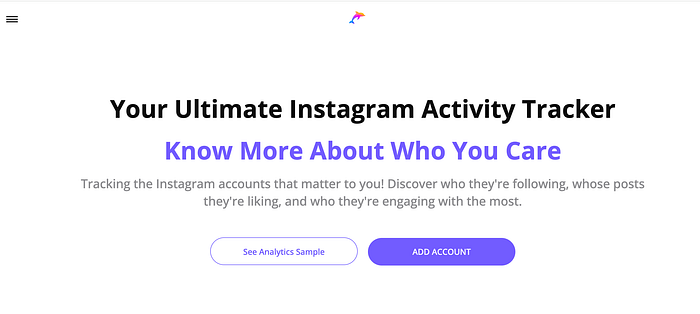
Dolphin adartool allows to go beyond anonymously viewing Instagram stories
What Are Instagram Story Viewer Tools?
An Instagram Story viewer tool, whether it’s an app or a website, allows you to view Instagram Stories anonymously. Typically, when you watch someone’s Story, Instagram notifies the person who posted it. This notification does not occur with regular posts, only with Stories.
There are several reasons why you might prefer to watch Stories anonymously. Firstly, many people feel that having their views reported infringes on their privacy and prefer to remain anonymous.
Secondly, there can be social reasons for wanting to remain unseen. Perhaps the person has posted something you’re curious about, but you have a complicated history with them. Watching their Story might lead to awkward conversations or send unintended signals. An anonymous viewer helps you avoid such issues.
Thirdly, you might need to gather information discreetly. This doesn’t make you an “Instastalker” — you could simply be keeping an eye on your significant other or monitoring your child’s activities. Additionally, for marketing purposes, you might want to study the interests and behaviors of your target demographic.
No matter your reason, Instagram Story viewers allow you to gather the information you need without the poster knowing.
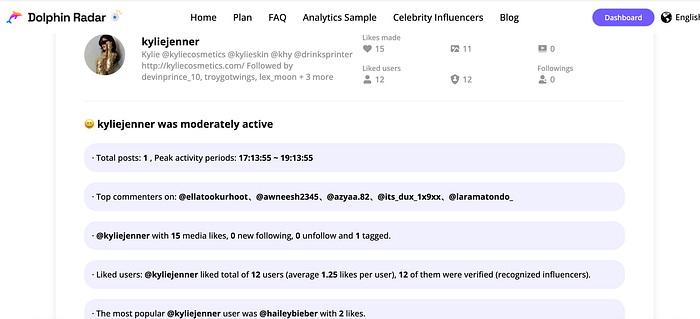
Overview of the Tracked User’s Activity
How to Use Instagram Story Viewer Tools
If you’re new to Instagram Story viewer tools, you’ll be pleased to know that most are quite user-friendly. While specifics can vary between tools, the general process is similar.
1. Select a Story Viewer Tool Your first step is choosing a Story viewer tool that suits your needs. There are many options, each offering different features. Some tools are apps to download, while others are web-based. Some are free, and others may require a subscription. Be sure to read user reviews and proceed with caution, as some tools may not work effectively or could pose risks to your device or privacy.
2. Locate the Story Poster’s Profile After selecting a tool, you need to find the profile of the person whose Story you want to view. Use their username, which appears at the top of their profile (often prefixed with an “@”), rather than their display name. This ensures you’re targeting the correct account, as usernames are unique.
3. Search for the Profile With the username in hand, open your chosen Instagram Story viewer. Most of these tools have a straightforward interface, typically featuring a search bar on the homepage. Enter the username into the search bar to locate the desired profile. You’ll see their profile as it appears on Instagram.
4. View the Story Anonymously Once you’re on the correct profile via the anonymous viewer tool, you can click on any Story to watch it without the poster knowing. It’s that simple!
Keep in mind that some Story viewers may limit the number of Stories you can watch within a certain timeframe or without a paid subscription.
Most Popular Instagram Story Viewer Tools
When it comes to viewing Instagram Stories anonymously, there is no shortage of tools at your disposal. Choosing the right one can be overwhelming. To help you get started, here are some of the most popular Instagram Story viewer tools that you might find useful. Remember to always check reviews, features, and pricing before making your decision.
Smihub
Smihub is incredibly straightforward and user-friendly. Accessible via any web browser, it features a search bar to help you find the profiles you’re interested in. Additionally, Smihub allows you to search for specific hashtags to view Stories associated with them. A standout feature of Smihub is its ability to download content from users’ profiles, a functionality not available on Instagram itself.
InstaStories
InstaStories is a widely favored tool for viewing Instagram Stories. This free service doesn’t even require you to have an Instagram account. Simply open the site on your browser, search for the desired profile, and watch their Stories anonymously. It’s as easy as that.
StoriStalker
StoriStalker is another popular choice, branding itself as an “Insta stalker” tool. Though you might associate it with checking up on someone, it can be useful for a variety of purposes. To use StoriStalker, you need to sign up for an account. While some information is available for free, accessing more detailed insights may require a paid subscription.
These tools offer a range of features to suit different needs, so you can select the one that best fits your requirements for anonymously viewing Instagram Stories.
How to Learn More from Instagram Anonymously
Watching Instagram Stories anonymously can provide valuable insights without revealing your identity, but it’s not the only way to gather information discreetly on Instagram. Another powerful tool to consider is Dolphin Radar.
Dolphin Radar allows you to monitor the posts a person has liked and the accounts they have recently started following. Additionally, it provides insights into their top hashtags and topics of interest. This tool is excellent for understanding what kind of content captivates someone and identifying who they engage with on Instagram, all without the person knowing you are tracking their activities.
How to Use Dolphin Radar for Instagram Tracking
If you want to experience Dolphin Radar for yourself, follow these steps:
1. Create a Dolphin Radar Account Begin by creating an account on Dolphin Radar. Head over to DolphinRadar.com and click “Sign Up” at the top right corner. This will allow you to manage the profiles you track and access your reports.
2. Select Your Dolphin Radar Subscription Plan After registering your account, choose a subscription plan that suits your needs.
3. Add the Accounts You Want to Monitor With your subscription plan active, you can start tracking any public Instagram accounts. From your dashboard, click “Add Account.” Enter the Instagram username you wish to monitor and click “Check.” If the correct profile appears, click “Add Account” to begin tracking it.
4. Receive Weekly Reports Once you’ve added the desired accounts, Dolphin Radar will generate weekly reports for each one. These reports will detail all the posts they’ve liked, categorize their liked posts by the posters they interact with most frequently, and provide various other data about their weekly activity.
Important Tips for Using Instagram Story Viewer Tools
Using an Instagram Story viewer for the first time? Here are some key points to keep in mind:
Public vs. Private Accounts
Most Instagram Story viewers only allow you to access Stories from public profiles. Private profiles, which restrict their content to approved followers, are typically not accessible via these tools.
Instagram Story Duration
Remember that Instagram Stories are temporary, visible only for 24 hours. Story viewer tools do not extend this duration, so if there’s a Story you want to view anonymously, you need to act quickly.
Tool Limitations
While Instagram Story viewers are great for maintaining anonymity, they are limited to showing you the same content available on the public profile. For more in-depth information, consider using an anonymous Story viewer alongside another tool like Dolphin Radar, which provides comprehensive tracking of Instagram activity.
Learning About Someone on Instagram
Whether you’re seeking marketing insights or personal information, the right combination of tools is crucial for effective Instagram tracking. Use the guidelines above to leverage Instagram Story viewers and sign up for Dolphin Radar to gain a deeper understanding of someone’s Instagram activity.
Read More
