



How to See Who Follows Someone on Instagram?

Table of Content
Basic Steps to See Who Someone Recently Followed on Instagram
To get started, open the Instagram app on your device, log into your account, and search for the username you’re interested in. Once on their profile, go to the “Following” tab. Typically, the most recent follows may appear at the top of the list, so you can scroll through to see a full view of their following activity.
While it can take time to accurately track who someone recently followed, various methods may help. In this guide, we’ll explore different options to see recent follows on Instagram, with and without third-party tools.
Instagram Following List Order
Have you tried to sort another user’s followers by “most recent” but found it doesn’t work? Currently, Instagram doesn’t offer a way to organize other users’ following lists, though you can sort your own. Here’s how:
- Open Instagram and go to your profile.
- Tap the “Following” list, look for “Sorted by Default,” and click the arrows.
- Look for the Sorted by Default section and click the up and down arrow sign.
- Change the setting, and select Date followed: Latest to sort by most to least recent.
However, if you’re interested in seeing who others recently followed without needing access to their account, other techniques may be useful.
Understanding How Instagram Sorts Following Lists
Instagram typically randomizes the display order of a user’s following list, so it’s challenging to tell who was followed recently. The order may also vary by device, and for profiles with over 500 followers, it’s nearly impossible to pinpoint recent follows.。
Techniques to See Who Someone Recently Followed on Instagram
To get the best results, you can use Instagram on a desktop or mobile browser with Desktop View enabled. Other users’ recently followed profiles may appear at the top of the list. Notifications on Instagram can also provide clues; if you share mutual connections, the app may notify you when they follow new accounts.
How To See Who Someone Recently Followed On Instagram Through IG Notifications (for Android/ iOS devices)
- Open Instagram on your device and check the Notifications tab.
- Look for updates indicating mutual followers have followed someone new.
- Tap their name to check if the recent follow is near the top of their “Following” list.
Verify by logging into Instagram on your browser and enabling Desktop Site or using your computer to replicate the process. Another approach is Instagram’s Supervision feature.
Using Instagram Supervision to See Recent Follows
Instagram’s Supervision feature, available only for monitoring users aged 13 to 17, allows parents to oversee who their teens follow and connect with. To use this:
- Log in and go to your profile.
- Tap the three-line menu, go to “Supervision,” and add the account you want to monitor.
- Log in to Instagram and tap on your profile icon.
- Click the three stacked menu lines (A.K.A. the Hamburger button) at the corner of your screen.
- Go to the Supervision section. Then, choose your settings and add the account you want to supervise.
You can only use Instagram’s Supervision feature to monitor a teen’s account (users aged 13 to 17 years old). This tool will allow you to closely monitor another user’s Instagram activities, including who they connect with and follow. If you’re a parent who wants to manage your child’s Instagram account, this feature is best for you. It sends you updates on your teen’s followers, recently followed profiles, Instagram time usage, and other platform activities. But, there are two caveats: (1) both the parent and the teen must agree to participate and set up Instagram’s supervision tool, and (2) the parental supervision feature will automatically end when the teen turns 18.
Using Third-Party Apps
While Instagram itself doesn’t provide detailed insights into someone’s recent follows, some third-party tools claim to offer these services. One such tool is Dolphin Radar, which provides comprehensive tracking of Instagram activity, including recent follows.
Dolphin Radar Features:
- Anonymous Tracking: You can monitor Instagram accounts without the person knowing.
- Detailed Reports: You’ll receive weekly, monthly, or even quarterly reports on follows, likes, and other interactions.
- AI Insights: Dolphin Radar’s AI-powered analysis provides in-depth insights into behavioral patterns, MBTI, relationships, psychology, location, and more. With AI Insights, you’ll get detailed, actionable reports based on posts, likes, and other social media activities. The more data you track, the more accurate and valuable these insights become — perfect for uncovering unusual behaviors or better understanding social patterns.
You can check out the AI Insights sample for @kyliejenner below.
To use Dolphin Radar:
- Sign Up on their website and create an account.
- Enter the Instagram username of the person you want to track.
- Wait for Dolphin Radar to generate a detailed report on their recent activity, including follows.
Here’s an example of an activity report for Kylie Jenner’s Instagram: Kylie Jenner Activity Report.

Limitations of Third-Party Tools
It’s important to remember that using third-party tools can sometimes violate Instagram’s terms of service, potentially leading to the suspension of your account. Additionally, such services may not always be reliable, and you should be cautious about sharing personal information with these platforms.
What kind of info you can dig up with Dolphin Radar’s Instagram activity tracking reports?
Here’s a sneak peek at Dolphin radar’s Activity Analytics Sample, which you can use to see if their service meets your needs. I’ve also put together a quick rundown of the info to help you out. Hope this helps!
Overview of Someone’s Instagram Activity
Dolphin Radar offers a snapshot of someone’s Instagram activities over the past week. This includes their active time slots on Instagram, any changes in the accounts they follow (including new follows and unfollows), how many likes they’ve dished out, and the accounts they interact with the most.

Details on Likes
You’ll see a detailed list of all the likes someone has made on Instagram over the past week. This includes the accounts they liked, the number of likes, and the content of those likes. You can even click on user avatars and liked content to jump directly to the corresponding Instagram page or post. This makes it easier for you to check if their likes raise any red flags.
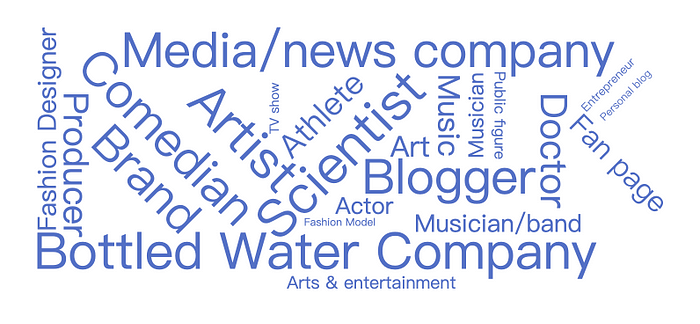
Someone’s Instagram Interest Tags
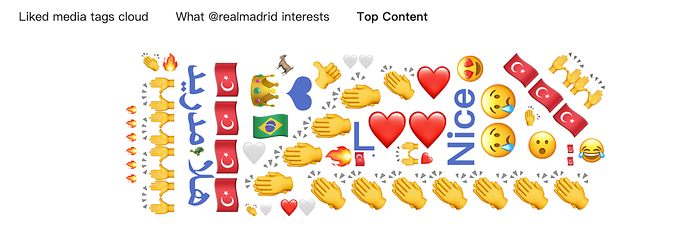
Dolphin Radar uses big data analytics to analyze the content and accounts someone likes. Then, it displays their recent interests in a tag cloud format. When someone suddenly gets interested in stuff they never cared about before, it can often be a red flag. Keep an eye out!
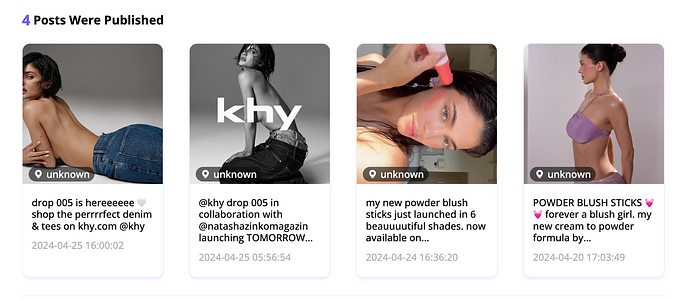
View Past Posts Effortlessly
You can now view someone’s historical posts easily with Dolphin Radar, saving you the hassle of checking their account post by post.
Top 5 Accounts with Most Comments
Discover the top 5 accounts that comment the most on someone’s posts. This can help you identify who they interact with the most, giving you insights into their social circle and frequent interactions. Pay special attention to these comments; frequent or overly personal comments might indicate closer relationships.
Identify Suspicious Accounts
Dolphin Radar helps you identify potential suspicious accounts linked to someone’s Instagram profile across Twitter, LinkedIn, Pinterest, TikTok, and Snapchat.
Downloadable Analytics:
Download detailed analytics and access all data in a CSV file, including information not shown above.
Track Historical Reports:
To better track and understand someone’s Instagram activity, Dolphin Radar offers historical report tracking for up to 36 weeks of data. This allows you to observe trends, changes in behavior, and any unusual activities over an extended period.

Additionally, depending on the subscription plan, monthly, quarterly, and annual tracking reports will be sent.
AI Insights Feature
Dolphin Radar’s AI Insights feature helps you track someone’s social media activity and gain deeper insights.
- AI-powered analysis provides insights into behavior, MBTI, relationships, psychology, location, and more.
- AI Insights offers detailed and actionable reports based on someone’s posts, likes, and other social media activities. The more data you track, the more accurate and valuable the insights become.
- AI Insights helps you understand someone better by analyzing their social media activities and generating comprehensive reports, including uncovering any unusual behaviors.
- You can check out the AI Insights sample for @kyliejenner below.

New Feature: Ties & Trails
With Dolphin Radar’s Ties & Trails feature, you can now build a complete, long-term view of someone’s Instagram activity. Ties & Trails tracks their evolving social patterns over time, helping you uncover key interactions, favorite locations, and trending topics.
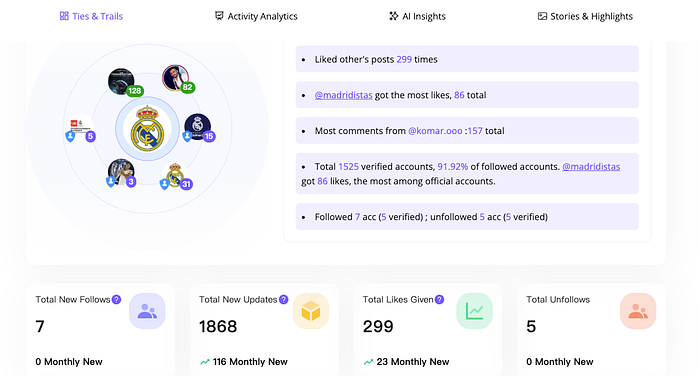
- Social Connections: See who consistently interacts with your target, giving you insights into their closest connections and social circle.
- Location Insights: Track suspected locations they frequent, revealing patterns in their movements and routine hangouts.
- Content Trends: Get an overview of their favorite topics and hashtags with Content Cloud Tags, showing you their interests and online persona.
- Behavioral Patterns: Notice subtle shifts in their behavior, like increased interaction with certain profiles or changes in content focus.
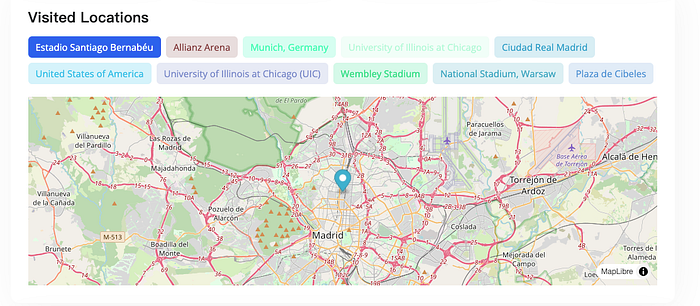
Ties & Trails gives you the ultimate tool to understand someone’s Instagram world deeply, with a continuously updated, in-depth profile over time.
Conclusion
While Instagram doesn’t directly allow you to see who someone recently followed, several techniques can give you a clearer picture of their activity. From notifications to exploring settings like Supervision, there are ways to stay informed within the app’s limits. Remember to be cautious if you decide to use third-party tools, as they can pose privacy risks. If you’re interested in exploring more social media tips and insights, be sure to check out our other guides on making the most of your Instagram experience!
Read More
