



What Order Does Instagram Show Followers?

Last updated: August 26, 2025
How Does Instagram Organize Followers and Following Lists?
Instagram has never fully revealed how its algorithm orders followers and followings. However, from user experiences and studies by social media experts, we have some clues.
In the past, Instagram sorted these lists in chronological order, showing the most recent followers at the top. But with recent updates, the algorithm has become more sophisticated, and the order is now determined by various factors that encourage user engagement.
Factors Influencing the Order of Instagram Followers
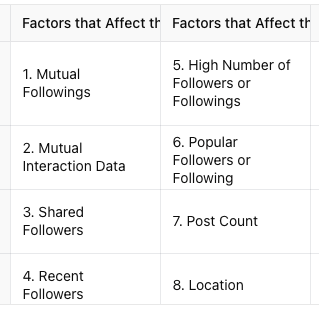
Mutual Followings: If you and another person both follow the same accounts, Instagram tends to show these shared connections at the top of your followers list. This makes it easier for users to identify mutual interests and connections, which can lead to more meaningful interactions.
Interaction Frequency: How much you interact with certain accounts also influences their placement. Likes, comments, direct messages, tags, and shared posts are all considered. Accounts that you engage with frequently or that engage with you are more likely to appear higher on the list.
Shared Followers: Instagram often displays users who are mutual followers of both you and the account owner near the top. This makes it simple for users to discover people they might know or have common connections with.
Recent Activity: New followers or recently active accounts may appear higher on the list, especially if they have been posting, liking, or commenting recently.
Follower and Following Count: Accounts with a large number of followers or followings often rank higher in the list, as they may have more visibility and interactions.
Verified Accounts and Influencers: Accounts with a blue checkmark or high engagement levels, like influencers or celebrities, tend to rank higher due to their popularity and the frequency with which people interact with them.
Post Frequency and Engagement: Accounts that post regularly and have high engagement rates are more likely to be placed near the top of the follower list, as they are considered more active and engaging.
Location Proximity: Users who are geographically close to you might appear higher in the follower list, as location data can influence visibility and interaction likelihood.
What Does “Sort by Default” Mean?
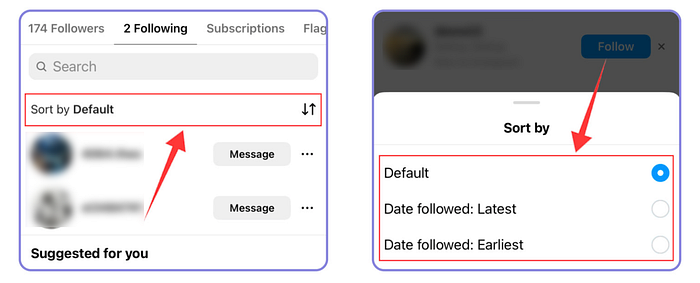
When you choose “Sort by Default” in the Instagram app, you’re opting for Instagram’s standard algorithm-based sorting method. This sort order is influenced by factors like interaction history, shared connections, and account activity, rather than simply displaying the most recent followers at the top.
Why Follower Order is Important
The order of your followers list can impact how your profile is perceived by others. If your top followers include well-known accounts or influencers, it can boost your credibility and appeal. Moreover, appearing at the top of someone else’s followers list can help increase your visibility and potentially gain new followers.
While these factors can give you a general idea of how Instagram arranges followers, the algorithm is ever-changing and tailored for each user. This can make it challenging to pinpoint the exact ranking logic, but understanding the basics helps you better manage your profile.
Simplifying the Analysis of Your Follower List
Manually going through your follower list can be a tedious task, especially if you’re trying to find out who has recently followed or unfollowed you. Using a third-party tool can help streamline the process.
However, it’s important to choose your tools wisely, as connecting your Instagram account to untrusted third-party applications can pose risks to your privacy and security. If you’re looking for a secure option to monitor Instagram activity without compromising your account, Dolphin Radar is a great choice.
How to Use Dolphin Radar for Instagram Activity Tracking
Dolphin Radar allows you to track Instagram activity anonymously and provides detailed reports on recent interactions. Here’s how to get started:
- Sign Up: Create an account on Dolphin Radar’s website.
- Add an Instagram Username: Input the username of the account you want to monitor.
- Generate a Report: Dolphin Radar will compile data and create a detailed activity report for you.
What You Can Learn from Dolphin Radar’s Reports
Dolphin Radar’s reports include insights such as:
· Overview of Recent Activity: See a summary of changes in following and follower lists, recent interactions, and active times on Instagram.
· Likes Analysis: Review all the posts liked by the tracked account, along with details on the type of content liked.
· Interest Trends: Get a visual representation of the content types and interests that the account has recently shown interest in.
· Top Commented Accounts: Identify the top five accounts that interact the most with the tracked profile, helping you understand their closest connections.
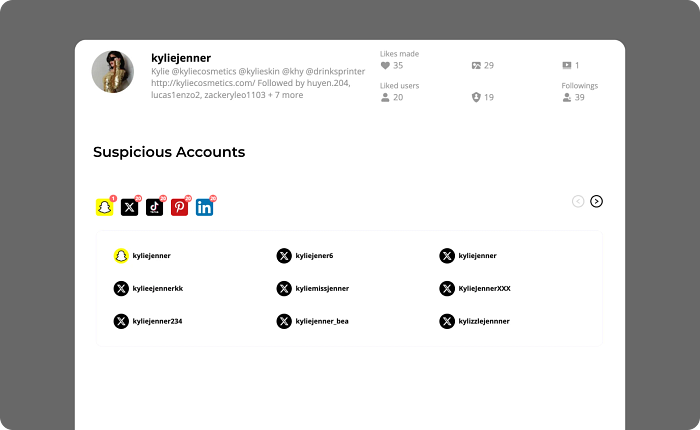
· Potential Suspicious Accounts: Discover possible suspicious accounts associated with the Instagram profile, including linked accounts across other social media platforms.
· Historical Activity Reports: Get access to past data and track activity trends over time to understand behavior changes.
Why Choose Dolphin Radar?
Dolphin Radar is a powerful tool for monitoring Instagram activity without linking your own Instagram account. It ensures anonymity and doesn’t compromise your personal data. It’s perfect for tracking public Instagram profiles and gaining deeper insights into someone’s social media habits.
Here’s an example of an activity report for Kylie Jenner’s Instagram: Kylie Jenner Activity Report.
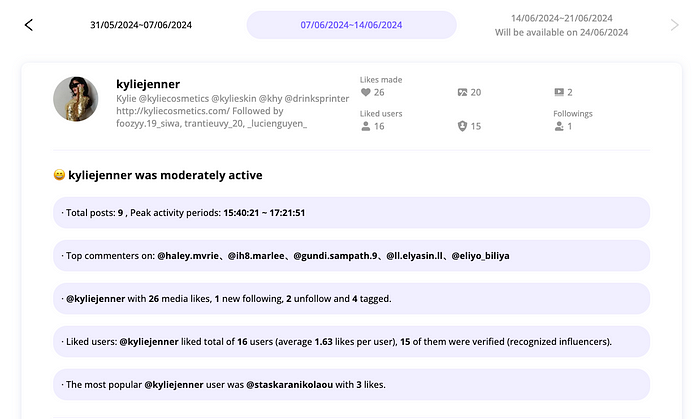
I’ll use this example report tracking Kylie Jenner on Instagram to show you what insights you can gain from Dolphin Radar’s reports.
Overview of Someone’s Instagram Activity
Dolphin Radar offers a snapshot of someone’s Instagram activities over the past week. This includes their active time slots on Instagram, any changes in the accounts they follow (including new follows and unfollows), how many likes they’ve dished out, and the accounts they interact with the most.

Details on Likes
You’ll see a detailed list of all the likes someone has made on Instagram over the past week. This includes the accounts they liked, the number of likes, and the content of those likes. You can even click on user avatars and liked content to jump directly to the corresponding Instagram page or post.
Someone’s Instagram Interest Tags
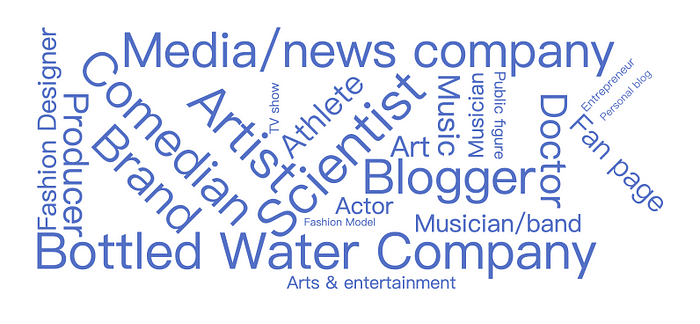
Dolphin Radar uses big data analytics to analyze the content and accounts someone likes. Then, it displays their recent interests in a tag cloud format. When someone suddenly gets interested in stuff they never cared about before, keep an eye out!
View Past Posts Effortlessly
You can now view someone’s historical posts easily with Dolphin Radar, saving you the hassle of checking their account post by post.
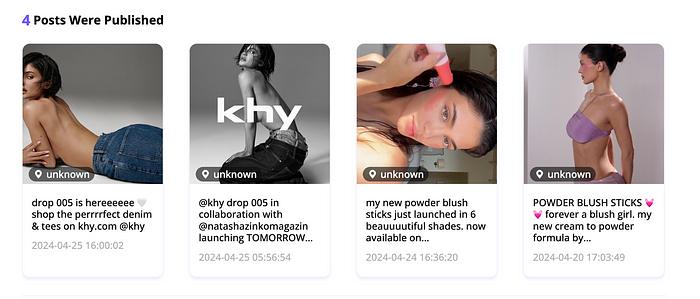
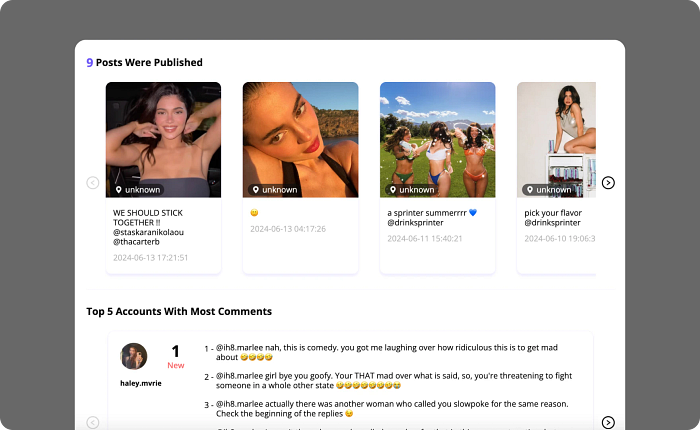
Top 5 Accounts with Most Comments
Discover the top 5 accounts that comment the most on someone’s posts. This can help you identify who they interact with the most, giving you insights into their social circle and frequent interactions. Pay special attention to these comments; frequent or overly personal comments might indicate closer relationships.
Identify Suspicious Accounts
Dolphin Radar helps you identify potential suspicious accounts linked to someone’s Instagram profile across Twitter, LinkedIn, Pinterest, TikTok, and Snapchat.
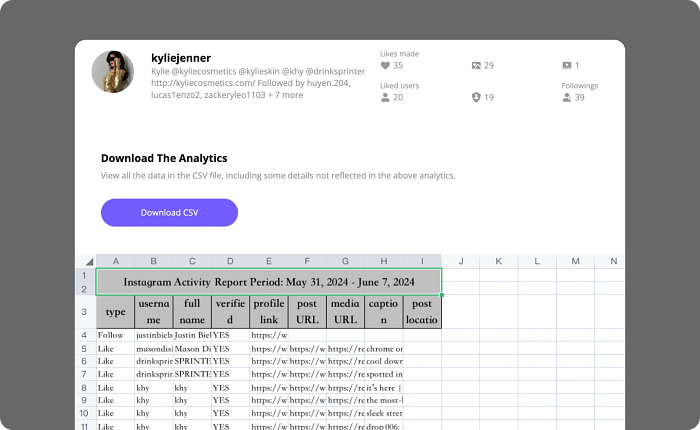
Downloadable Analytics
Download detailed analytics and access all data in a CSV file, including information not shown above.
Track Historical Reports
To better track and understand someone’s Instagram activity, Dolphin Radar offers historical report tracking for up to 36 weeks of data. This allows you to observe trends, changes in behavior, and any unusual activities over an extended period.
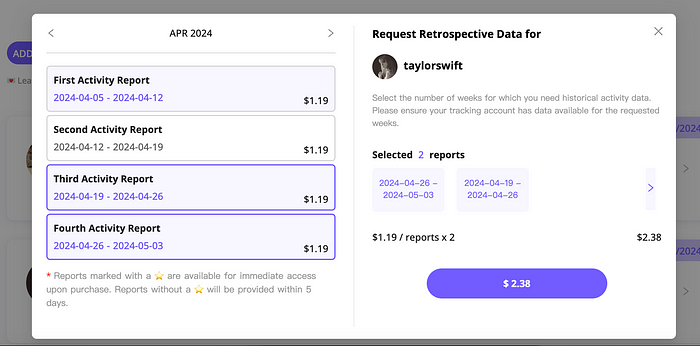
Additionally, depending on the subscription plan, monthly, quarterly, and annual tracking reports will be sent.
What’s New in Dolphin Radar After the Upgrade
AI Insights Feature
Dolphin Radar has launched a new AI Insights feature to help you track someone’s social media activity and gain deeper insights.
· AI-powered analysis provides insights into behavior, MBTI, relationships, psychology, location, and more.
· AI Insights offers detailed and actionable reports based on someone’s posts, likes, and other social media activities. The more data you track, the more accurate and valuable the insights become.
· AI Insights help you understand someone better by analyzing their social media activities and generating comprehensive reports, including uncovering any unusual behaviors.
Final Thoughts
Understanding the order of Instagram followers and what affects it can help you optimize your account’s appearance and interactions. While Instagram’s algorithm is complex and always evolving, using a tool like Dolphin Radar can make tracking changes and gaining insights much easier.
Whether you’re an influencer, business owner, or just curious about someone’s Instagram activity, Dolphin Radar offers a secure and effective way to keep tabs on social media interactions and trends.
Read More
