



How to See Liked Posts on Instagram

Luckily, Instagram keeps track of the posts you’ve liked, making it easy to go back and find them when needed. This feature allows you to revisit posts, leave comments, or simply enjoy them again. Here’s a quick guide on how to access your liked posts on Instagram.
Viewing Your Liked Instagram Posts
Instagram provides a simple way to see the posts you’ve liked recently. Follow these steps:
- Tap your Profile icon in the bottom right corner.
- Select the Menu in the top right, then tap Your Activity.
- Tap Interactions, followed by Likes.
- Browse through your liked posts to revisit any photos or videos.
Organizing Your Liked Posts
If you want to sort or filter your liked posts for easy access, here’s how:
- Tap Sort & Filter at the top of the activity screen.
- Choose from options like oldest to newest, specific date ranges, or by author.
- Reset the filter to return to viewing your most recent likes.
iPhone Users: Accessing Liked Posts
For iPhone users, here’s how to see your liked Instagram posts:
- Open the Instagram app or visit the website.
- Tap your profile picture in the bottom right corner.
- Click the three lines in the top right corner of your profile page.
- Go to Your Activity and then Interactions.
- Select Likes to view your liked posts.
Android Users: Viewing Liked Posts
If you’re using an Android device, you can view your liked posts by:
- Launching the Instagram app.
- Tapping your profile icon at the bottom right.
- Selecting the three lines in the top right corner.
- Going to Your Activity and tapping Interactions.
- Choosing Likes to see your past activity.
Can You See Liked Posts on a PC?
Currently, the desktop version of Instagram doesn’t support viewing liked posts. While you can like posts on your computer, reviewing your likes is limited to the mobile app.
How Long Are Liked Posts Saved?
Instagram keeps a record of your most recent 300 likes. While there’s no set expiration, anything beyond this number won’t be accessible, so it’s useful for those who don’t frequently like posts.
Curious About What Others Like?
You might wonder what posts others find interesting on Instagram. While Instagram itself doesn’t provide a direct way to see another user’s likes, you can get insights using third-party tools.
Using Tools Like Dolphin Radar
For those interested in a deeper look into Instagram activity, tools like Dolphin Radar can offer comprehensive insights. Dolphin Radar lets you monitor likes and activity without needing to use the official Instagram site, providing a convenient way to track what users are engaging with.
Whether you’re revisiting your favorite posts or curious about others’ activity, these features and tools make navigating Instagram a more enriched experience.
Getting Started with Dolphin Radar
Step 1: Sign Up for a Dolphin Radar Account
Go to Dolphin Radar’s website and sign up with your email address.
Step 2: Purchase Your Plan
Choose a plan based on the number of accounts you want to track. Plans start at just $4.49 per month. There are three subscription options: monthly, quarterly, and annual. With the annual subscription, you pay only $2.75 per month.
Step 3: Add Accounts to Track
Click “Add Account” and enter the Instagram handle of the account you want to track. You don’t need access to their phone or Instagram password.
As long as the account is public, you’ll start receiving weekly reports, including their liked posts, new follows, and top hashtags.
Advantages of Tracking an Instagram Account with Dolphin Radar
Dolphin Radar provides benefits that manual tracking and spyware apps cannot match. First, the data you receive is detailed, precise, and reliable. Second, the tool operates with high discretion. Dolphin Radar is not connected to your Instagram account in any manner. The user won’t be aware they’re being monitored, and they won’t know specifically that you are the one tracking their activity.
Here’s an example of an activity report for Kylie Jenner’s Instagram: Kylie Jenner Activity Report.

I’ll use this example report tracking Kylie Jenner on Instagram to show you what insights you can gain from Dolphin Radar’s reports.
Overview of Someone’s Instagram Activity
Dolphin Radar offers a snapshot of someone’s Instagram activities over the past week. This includes their active time slots on Instagram, any changes in the accounts they follow (including new follows and unfollows), how many likes they’ve dished out, and the accounts they interact with the most.

Details on Likes
You’ll see a detailed list of all the likes someone has made on Instagram over the past week. This includes the accounts they liked, the number of likes, and the content of those likes. You can even click on user avatars and liked content to jump directly to the corresponding Instagram page or post.
Someone’s Instagram Interest Tags
Dolphin Radar uses big data analytics to analyze the content and accounts someone likes. Then, it displays their recent interests in a tag cloud format. When someone suddenly gets interested in stuff they never cared about before, keep an eye out!

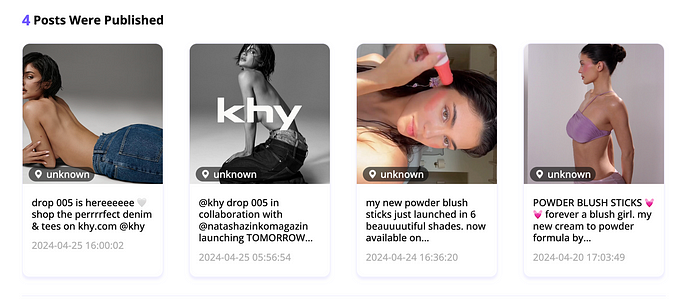
View Past Posts Effortlessly
You can now view someone’s historical posts easily with Dolphin Radar, saving you the hassle of checking their account post by post.
Top 5 Accounts with Most Comments
Discover the top 5 accounts that comment the most on someone’s posts. This can help you identify who they interact with the most, giving you insights into their social circle and frequent interactions. Pay special attention to these comments; frequent or overly personal comments might indicate closer relationships.
Identify Suspicious Accounts
Dolphin Radar helps you identify potential suspicious accounts linked to someone’s Instagram profile across Twitter, LinkedIn, Pinterest, TikTok, and Snapchat.
Downloadable Analytics
Download detailed analytics and access all data in a CSV file, including information not shown above.
Track Historical Reports
To better track and understand someone’s Instagram activity, Dolphin Radar offers historical report tracking for up to 36 weeks of data. This allows you to observe trends, changes in behavior, and any unusual activities over an extended period.
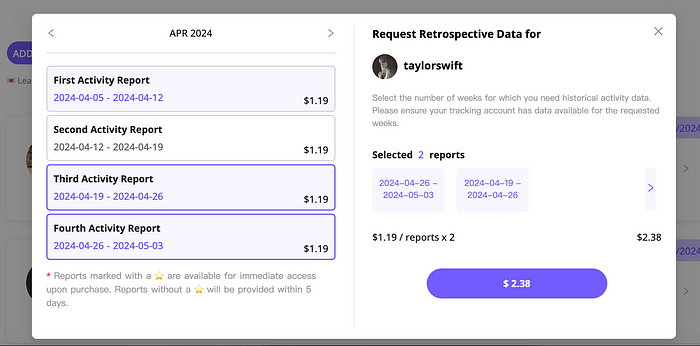
Additionally, depending on the subscription plan, monthly, quarterly, and annual tracking reports will be sent.
What’s New in Dolphin Radar After the Upgrade
AI Insights Feature
Dolphin Radar has launched a new AI Insights feature to help you track someone’s social media activity and gain deeper insights.
· AI-powered analysis provides insights into behavior, MBTI, relationships, psychology, location, and more.
· AI Insights offers detailed and actionable reports based on someone’s posts, likes, and other social media activities. The more data you track, the more accurate and valuable the insights become.
· AI Insights help you understand someone better by analyzing their social media activities and generating comprehensive reports, including uncovering any unusual behaviors.
You can check out the AI Insights sample for @kyliejenner below.

Conclusion
Instagram has undergone many changes in recent years, with one of the most valuable updates being the ability to view and organize the posts you’ve liked. With a newsfeed full of engaging content, it’s easy to find yourself liking numerous posts and wanting to revisit them later. Knowing how to access your liked posts can be incredibly useful, and this guide is here to help you do just that. Hopefully, these tips make navigating your Instagram likes easier and more enjoyable!
Read More
