



How do I see what people liked on instagram?
You Can’t Directly See What Someone Has Liked
Let’s clear this up right away: Instagram doesn’t provide a specific feature where you can view everything a user has liked. While users can like photos, videos, and stories, there isn’t a simple “liked posts” section you can access to view all their activity.
Manually Check Posts to See Likes
However, you can manually check posts to see if someone has liked them. Instagram allows you to view the list of users who have liked a specific post by selecting the number of likes displayed under the image or video. From there, you can scroll through the names to see if the person you’re looking for is listed. This method works even for posts on private accounts (assuming you’re following them).
Check Their Following List to Track Likes
Another way to potentially find out what someone has liked is by looking through their Following list. Go to the user’s profile and tap on “Following” to see the accounts they follow. You can then visit the profiles of those followed accounts and browse their posts to see if the user has liked any content. If their account is private, though, you’ll need to request to follow them before accessing this information.
Third-Party Tools and Websites
While Instagram doesn’t allow for a centralized view of another user’s likes, you can still check individual posts and explore their following list to track down some of their likes.
Several third-party tools and websites have claimed to offer insights into someone’s recent Instagram follows. One such tool is Dolphin Radar.
· No Login Required: You don’t need to log into your Instagram account or provide any Instagram access. Simply enter the Instagram username of the person you want to track, and you can start monitoring.
· Accurate Data: Dolphin Radar offers precise tracking based on your needs, providing weekly, monthly, quarterly, and annual reports.
· Absolute Anonymity: The person you’re tracking will have no idea you’re monitoring them, ensuring complete peace of mind for you.
By using Dolphin Radar, you can gain a comprehensive view of someone’s Instagram activity without compromising your own account’s security.
How to Use DolphinRadar
DolphinRadar is an advanced tool that allows you to monitor Instagram activities anonymously. It provides detailed reports on what content is liked, who is followed, and overall engagement metrics. To get started:
- Sign Up: Create an account on DolphinRadar’s website.
- Enter Username: Input the Instagram username of the account you want to monitor.
- Generate Report: Wait for DolphinRadar to gather data and generate a comprehensive report.
Here’s an example of an activity report for Kylie Jenner’s Instagram: Kylie Jenner Activity Report.
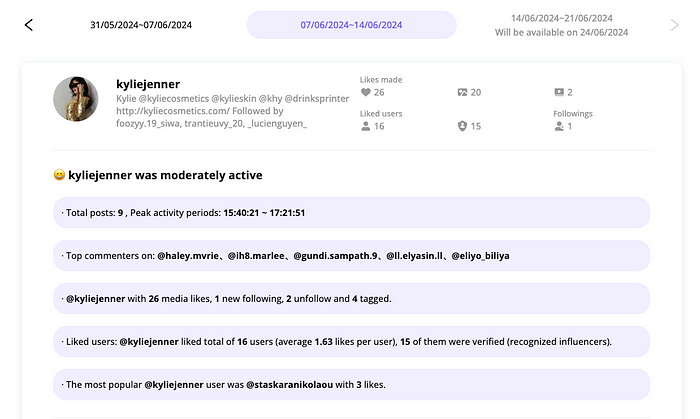
What kind of info you can dig up with Dolphin Radar’s Instagram activity tracking reports?
Here’s a sneak peek at Dolphin radar’s Activity Analytics Sample, which you can use to see if their service meets your needs. I’ve also put together a quick rundown of the info to help you out. Hope this helps!
Overview of Someone’s Instagram Activity
Dolphin Radar offers a snapshot of someone’s Instagram activities over the past week. This includes their active time slots on Instagram, any changes in the accounts they follow (including new follows and unfollows), how many likes they’ve dished out, and the accounts they interact with the most.

Details on Likes
You’ll see a detailed list of all the likes someone has made on Instagram over the past week. This includes the accounts they liked, the number of likes, and the content of those likes. You can even click on user avatars and liked content to jump directly to the corresponding Instagram page or post. This makes it easier for you to check if their likes raise any red flags.
Someone’s Instagram Interest Tags
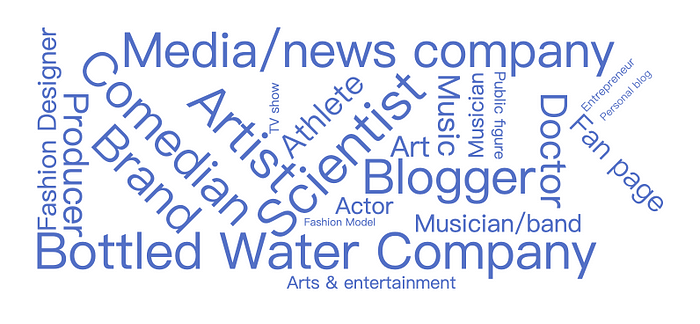
Dolphin Radar uses big data analytics to analyze the content and accounts someone likes. Then, it displays their recent interests in a tag cloud format. When someone suddenly gets interested in stuff they never cared about before, it can often be a red flag. Keep an eye out!
· View past posts: You can now view your partner’s historical posts. Dolphin Radar offers a much more efficient way than checking his account post by post.
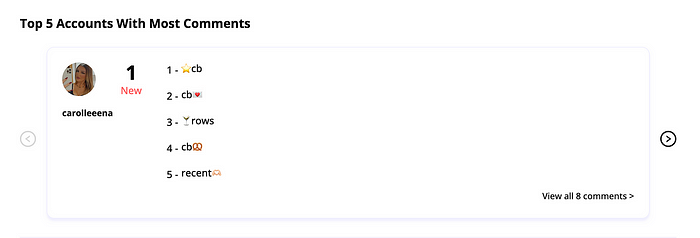
· View Top 5 Accounts With Most Comments
· View suspected accounts: Now, identify potential suspicious accounts linked to your tracked Instagram profile across Twitter, LinkedIn, Pinterest, TikTok, and Snapchat.
· Analytics now downloadable: Download the analytics and access all data in the CSV file, including details not shown above.
Additionally, depending on the subscription plan, monthly, quarterly, and annual tracking reports will be sent.
Respecting Privacy and Boundaries
While it’s natural to be curious about who someone recently followed on Instagram, it’s crucial to respect others’ privacy and boundaries on the platform. Here are a few key points to keep in mind:
· Respect Private Accounts: If someone has chosen to keep their account private, honor their decision and don’t attempt to bypass their privacy settings.
· Don’t Share Information Without Consent: If you gain access to someone’s recent follows, do not share this information with others without the person’s explicit permission.
· Use Information Responsibly: If you discover something about someone’s interests or connections through their Instagram activity, use this information responsibly and avoid making assumptions or judgments.
· Focus on Authentic Connections: Instead of fixating on who someone recently followed, concentrate on building genuine connections through engagement and shared interests.
By prioritizing privacy and respect in your Instagram interactions, you’ll not only create stronger and more meaningful relationships but also contribute to a more positive and trustworthy online community.
Read More
